Showing posts with label Jailbreak. Show all posts

Tuesday, August 3, 2010

PDF Loading Warner available in Cydia [Automatic Method]

Yesterday, we told you that JailbreakMe 2.0 opens a security hole because it works on major PDF-based bug in iOS which will enable any malicious access for your device, So we offered a manual method to install a .deb file on your device so it solve this security hole. Now we got an automatic method via Cydia to install PDF Loading Warner.
Today, Will Strafach which solved this issue using .deb file, has released PDF Loading Warner on Cydia to solve this issue using Cydia by automatic method. Simply download and install the package by searching cydia for "PDF Loading Warner" and it will automatically install the solution.
You may also like:
Update 1: For users getting issues with Clock and iBooks app, there's a fix for that posted here.

Ultrasn0w 1.0-1 to Unlock iPhone 4 is Ready to Release

For all who asking about the new update of Ultrasn0w to unlock iPhone 4, it's ready and will be released later this evening. In less than six hours, Ultrasn0w 1.0-1 will be released to unlock iPhone 4, iPhone 3GS and 3G. It's compatible with all basebands including the new baseband of iPhone 4 (BB 01.59.00)
We will inform you whenever the Unlock is ready, in meantime while waiting for the unlock you can jailbreak your iPhone 4 with JailbreakMe 2.0 by following the step by step guide posted here.

Monday, August 2, 2010

How to: Fix Purple Screen when Jailbreaking using JailbreakME

A lot of people got stuck on Purple screen when they try to jailbreak iPhone, iPod Touch or iPad using JailbreakME 2.0, the reason behind this problem is the large amount of history and cache on your mobile Safari browser, follow the instructions bellow to remove history from your mobile browser..
Step 1: Navigate to Settings --> Safari then go ahead and clear History, Cashe and Cookies
Step 2: Turn off your device for two minutes then turn it on again.
Step 3: Now, you will be able to Jailbreak your device using one of the guides below,
More Info about JailbreakME 2.0 can be found here, also don't forget to secure yourself from JailbreakME as it opens security holes.
[Thanks Mohammad for Tip via Twitter]

JailbreakME Opens a Security Hole? But can be Solved!

Yesterday, JailbreakME was released to jailbreak all iOS devices including iPhone 4 Apple device, but some people asked "if comex could figure out to access our devices through a website! then why can't anyone get in there?" Well, that's true, it really opened a security hole and it allows for malicious access for your device.
Comex used an exploit involving PDF files in your device so it can install Cydia, but it can install any other files too! Well, our advice is not to open any sites, not to open any links on your Mobile Safari browsers. Just stay away from hackers.. Also, there's a method to fix The PDF Exploit after jailbreaking with JailbreakMe found it on BGR, you can try this steps on your own risk:
Step 1: Install OpenSSH if you don't have it
Step 2: Download this .deb file
Step 3: SSH into your iDevice.
Step 4: Navigate to var/root/Media/Cydia/AutoInstall (If Cydia/AutoInstall isn’t already there, just create it)
Step 5: Drop the .deb file you downloaded into the AutoInstall folder.
Step 6: Reboot your iDevice 2 times.

Update 1: Now There's an automatic method to Install this .deb file from Cydia directly, check our post here.

Enable FaceTime over 3G with My3G

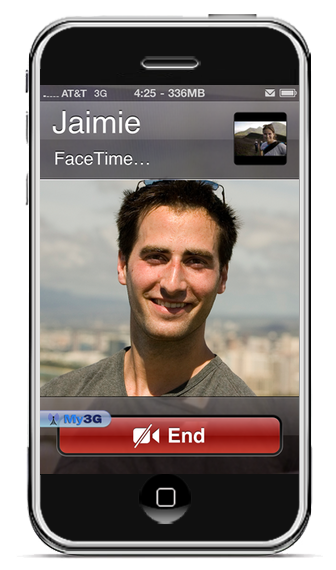
Yes, finally the much waited app from Rockyourphone to enable iPhone 4 FaceTime video calls over 3G is here and it comes just after JailbreakME 2.0 from comex. This is really an amazing app, check the description..
>div align='center'>
Facetime over 3G!!!!

My3G: Take back your 3G! My3G makes Apps believe that they are on WiFi instead of 3G. With My3G, you can now watch HiDef YouTube videos, use Skype/Fring/Other VOIP apps over the 3G network!

Features:
- In-App popup request to enable/never ask for My3G to be enabled for that app
- In-App indicator when My3G changes the network from 3G to WiFi
- Ability to select which apps are My3G enabled and not.
- Default Apps – no configuration for the most popular apps!
- SBSettings Toggle! You can temporarily enable My3G for all apps or toggle back using your defined Apps list
- Dynamic enablement – Higher successs rate (near 100%) then 3G Unrestrictor (which does one off solutions for apps). My3G enables 3G indicators more dynamically.

4.1 Updates
=============
- Facetime over 3G!!!
Of Course you need a jailbroken iPhone 4, (use userland jailbreak from comex JailbreakME 2.0 to jailbreak iPhone 4), head on and buy this app only for $3.99 only from Rockyourphone.

Sunday, August 1, 2010

How to: Fix MMS / FaceTime Bugs on iPhone 4 After using JailbreakME 2.0

JailbreakME 2.0 userland jailbreak which was released today by comex, made some bugs and errors for iPhone 4. The popular bugs are breaking MMS and FaceTime not appear in Settings app, But we may fix it by that way.
Steps:
It's all about restoring iPhone 4 from Backup then jailbreaking using JailbreakME 2.0
  • Backup your iPhone 4 by Connecting it to iTunes, Right click on the iPhone icon on left column, then click on "Backup your iPhone"
  • Now use JailbreakME 2.0 to jailbreak again your iPhone 4, guide posted here.
  • Restore from Backup by Clicking on the iPhone icon then hold left shift and click on "Restore", then navigate it to iOS 4.0.1 Original Firmware
Update 1: Now Fixed for new jailbreakers. About the old users, Planetbeing says "You should now be able to fix FaceTime and MMS by updating Cydia and resetting your network settings. If not, restore and rejailbreak."

iPhone 4 Unlock will be Released after Small Period

Comex has released his userland jailbreak JailbreakME 2.0 two hours ago, and people was still complaining about unlocking iPhone 4 as we told you that the Unlock is ready before the jailbreak. Now, MuscleNerd has tweeted that iPhone 4 Carrier Unlock will be pushed to Cydia in a small period.
iPhone4 carrier unlock will be pushed after small test period (only @planetbeing and I have been able to test til now!)
This doesn't mean that it will be pushed today, may be tomorrow! Just Stay tuned with me on Twitter or on Facebook and I will post unlock guide to Unlock iPhone 4

Update 1: Planetbeing tweeted that the unlock for iPhone 4 will be Coming in the next 48 hours,
We will be releasing the unlock in 48 hours (after we conduct a private beta).

How to: Jailbreak iPad 3G on iOS 3.2.1 using JailbreakME 2.0

Today is the jailbreak day as promised, Comex already released his userland jailbreak tool "JailbreakME 2.0", So here's a quick guide to enable you to jailbreak iPad 3G / Wifi on iOS 3.2.1 which was released two weeks ago.
Steps:
Step 1: Just navigate your Safari Browser to http://jailbreakme.com and it will show you "Slide to Jailbreak", just touch and slide to jailbreak
Step 2: You will have a jailbroken iPad after minutes of some processes.

How to: Jailbreak iPhone 4 on iOS 4 / 4.0.1 using JailbreakME 2.0

Comex has just released his new userland jailbreak tool minutes ago, this is a simple guide and instructions for all you need to know about this jailbreak, Now you can jailbreak any iPhone (including iPhone 4), iPod Touch or iPad on all Firmwares.
Steps:
Step 1: You just need Wi-Fi network, Navigate your Mobile Browser Safari to http://jailbreakme.com and then touch and slide to jailbreak.

Step 2: Now Have fun, You got a jailbroken iPhone 4 as mine:
Finally, comex has just released his new tool "JailbreakME " to Jailbreak iPhone 4 / 3GS New and Old Bootroms, iPod Touch 3G / 2G on iOS 4 / 4.0.1 and iPad on iOS 3.2.1, It's pretty simple and install is painless with one click! no need to enter DFU mode, no more issues and errors, more custom firmwares. This is the real fun!
Description in the Site:
What's a jailbreak? Why jailbreak?
A jailbreak is simply the ability to run apps and use themes and tweaks not approved by Apple. Jailbreaking doesn't slow down your device or use any extra battery, and is fully reversible (just restore in iTunes). A jailbreak lets your device be how you want it.

Is JailbreakMe reversible?
Of course! If you ever decide that you want to remove your jailbreak, just connect your device to your computer, sync, and then press Restore in iTunes.

Is this legal in the US?
Yes. A new DMCA excemption was approved by the Library of Congress, specifically allowing jailbreaking.

Credits
Jailbreak by comex, website by westbaer and chpwn. Special thanks go out to BigBoss, chronic, DHowett, MuscleNerd, planetbeing, posixninja, and saurik. Thanks to everyone else that tested and helped, and all who donated.
It's a userland jailbreak, So all what you have to do is navigate browse to http://jailbreakme.com from your iOS device to jailbreak it but it's not accesible at the moment as huge traffic on the server.

Update 1: Modmyi has uploaded the tool on their site, now you can acess http://jailbreakme.modmyi.com instead of the above
Update 2: Supported devices,
  • iPod 1G on 3.1.2
  • iPod 1G on 3.1.3
  • iPod 2G on 3.1.2
  • iPod 2G on 3.1.3
  • iPod 2G on 4.0
  • iPod 3G on 3.1.2
  • iPod 3G on 3.1.3
  • iPod 3G on 4.0
  • iPad on 3.2
  • iPad on 3.2.1
  • iPhone 3G on 3.1.2
  • iPhone 3G on 3.1.3
  • iPhone 3G on 4.0
  • iPhone 3G on 4.0.1
  • iPhone 3G[S] on 3.1.2
  • iPhone 3G[S] on 3.1.3
  • iPhone 3G[S] on 4.0
  • iPhone 3G[S] on 4.0.1
  • iPhone 4 on 4.0
  • iPhone 4 on 4.0.1
Update 3: Just posted How to Jailbreak iPhone 4 on iOS 4 / 4.0.1 HERE.
Update 4: Just posted How to Jailbreak iPad 3G on iOS 3.2.1 HERE.
Update 5: We were informed that JailbreakME 2.0 opens a security hole on your device, the way to fix it HERE.
Update 6: For who stuck on purple screen, we got a way to solve that, check our guide HERE.

Saturday, July 31, 2010

Upcoming Comex Jailbreak seems to be Released Today

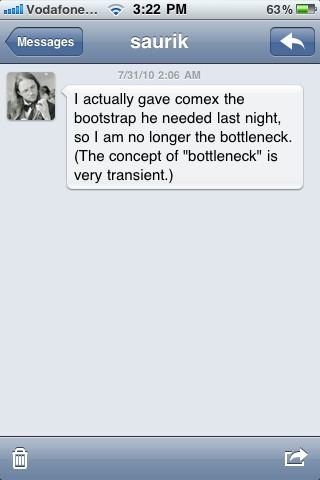
Quick heads up, someone published this image on the web, we don't know it's source but it's seems not fake! Comex mentioned in his podcast interview that he is waiting for saurik to finish Cydia bootstrap, the screenshot below shows a message from saurik saying that he already gave the bootstrap to comex.
I actually gave comex the bootstrap he needed last night. so I am no longer the bottleneck. (The concept of “bottleneck” is very transient.)
It seems really close, may be it will be released today and Sunday be the FunDay? Absolutely they are running a group of tests on all devices to be sure it's safe and excellent to be released for public, so Stay tuned!
Update 1: JailbreakME from Comex is out, Check here.

Warning:Jailbreak Fake List

In the last few days we heard about many new FAKE jailbreak tools, but I think this is normal cause they came parallel with the real new iPhone 4 / 3GS Jailbreak, which will be released very soon, so I made this post as a register of the FAKE jailbreaks, this post will be always updated with these fakes.
1-Sedna Jailbreak:
A lot of people talked about it, but Chpwn sent a tweet saying that the Sedna jailbreak is completely FAKE.
Chpwn said:I don't know anything about "Sedna" except it is completely fake...
2-Shitra1n:
I think this is not an apropriated name of a tool, so Sherif Hashif (dev team member) sent a tweet saying this is completely FAKE.
Sherif_Hashim said: I can't believe that ppl are really asking about the credibility of something called -shitra1n-, come on, the name says it FAKE-FAKE-FAKE
Note: You should ensure the source of any tool before trying in your iDevice.

@GeorgeHotz is not the Real GeoHot

We all (even me) thought that the new account on twitter @georgehotz is the real Geohot and we posted that he apologized to all people for his bad behavior. At first he started privately and once all knew that he apologized, he went public and got a lot of followers, Actually I was surprised when I saw this tweet from @gerogehotz
Someone mentioned @georgehotz hoping that he is the real Geohot, But he answered him,
Its not real its just for fun!
So, Now decide, Follow him for some fun but he is not real! he is a parody account!
Now let's wait for the real jailbreak from Comex.

First iPhone 4 Cydia App "SpringFlash"

This days we are talking a lot about the upcoming jailbreak for iPhone 4 from comex, now BigBoss has created his first iPhone 4 Cydia app "SpringFlash", it's available now in Cydia but you should have a jailbroken iPhone 4!
Here's the blog post with title "First iPhone4 Only Cydia App":
Since the jailbreak is due very soon, I have created SpringFlash, the first iPhone 4 only Cydia app. SpringFlash is a springboard activator based LED flashlight for your iPhone 4. In short, you can have a touch of a button for a bright LED flashlight without hassling with unlocking your iPhone, closing your app, or even turning on your screen.
As shown in the quote above, the app is a springboard activator which gives you a bright LED flashlight without hassling with iPhone Unlock, Sure it's available for free on BigBoss repo whenever the jailbreak is available!
Stay Tuned, we will be covering this jailbreak tool from comex whenever it's released and available for download

Jailbreak iPhone 4 on iOS 4.x is "Pretty Close to Done"

Good News to get the hopes up, in an all-star podcast interview with Comex, Planetbeing, Chpwn, and Saurik yesterday, Comex was asked "When is the iPhone 4 Jailbreak and Unlock is going to be released?", the answer was great "pretty close to done"
Question: When is the iPhone 4 Jailbreak and Unlock is going to be released?

Comex: You will have to ask Saurik if he’s done with that bootstrap yet. Like I hate to say this because people will be complaining, but it is pretty close to done.

PlanetBeing: Unlock is done. Just waiting for the jailbreak to be released.

Chpwn: The jailbreak definitely needs a lot of testing before it is released, to make sure it works on everybody’s phone, and that there are no issues like Spirit had where it deleted all of your photos in the first few days of the release.
[via Redmondpie]
So here's What to Do to get Ready for the Jailbreak!
First, Save SHSH of iOS 4.0.1 Using TinyUmbrella for iPhone 4 / 3GS / iPod Touch 3G and Using Cydia for iPhone 3G / iPod Touch 2G
Second, Backup your Data in Case the Jailbreak has some issues (Save photos, contacts and videos)
Third, Follow me on Twitter, Become a fan on Facebook or Subscribe via Mail / RSS to be the First who Jailbreak.

So not to ask me, This jailbreak will work on any iDevice in the world, This jailbreak will be able to jailbreak iPhone 4 / 3GS New and Old Bootroms / 3G - iPod Touch 3G / 2G MC and Non-MC Models on iOS 4.x, Also for iPad on iOS 3.2.1

Friday, July 30, 2010

Geohot Apologizing

Geohot the has just sent a tweet from few seconds, he apologized about his behavior and suddenly disappearance, as we know George Hotz is a big name in the jailbreak world he is the creator of the blakra1n and blacksn0w tools. See what he said after the break.

I understand most of you say you depend on my work, but reality is I made a lot of great tools and resources for others to continue. I apologize for my behavior the last few months but you must understand my life doea not revolve around just iphone. This was something I picked up for fun and now it has turned to much more than that. we have many great people on the scene now, please check them out. i don't plan on releasing anything soon. Thank you.
I think it is not logic to see one don't like fame, money, appreciation and respect from people, cause the jailbreakers look like Hollywood Stars in the internet community, I think that Geohot may continue but via his friend Mike Cohen.

Update 1: @GeorgeHotz is not the Real Geohot, more details posted here.

Thursday, July 29, 2010

Download iOS 4.0.1 Custom Firmware for iPhone 3GS Old Bootrom

Just found iOS 4.0.1 Custom Firmware for iPhone 3GS Old Bootrom to Jailbreak iPhone 3GS with the Easy way without need to launch Sn0wbreeze or PwnageTool and create your own Custom Firmware, Here's a ready Custom Firmware, all you have to do is to restore with this Firmware using iTunes..
Note:
Your Device must be pre-jailbroken on iOS 4, If not then you can use use PwnageTool on Mac or Sn0wbreeze on Windows to Jailbreak iOS 4 on iPhone 3GS Old Bootrom.

Steps:
Step 1: Download the Custom iOS 4.0.1 Firmware and iTunes 9.2.1 [Links at the end of page]
Step 2: Connect your Device to Computer then launch iTunes
Step 3: an iPhone icon will appear on the left, Click on it
Step 4: Now hold left “Shift” button (“Alt” button on Mac) and Click on Restore, If it doesn't work then try going in DFU Mode or Recovery Mode.
Step 5: Now, point iTunes to the Custom Firmware you already downloaded
Step 6: After series of process, iTunes will restore your Firmware and you will get a jailbroken iPhone 3GS.

After Successfully Jailbreaking iPhone 3GS, You will be able to Unlock it using Ultrasn0w 0.93, Just follow the step by step guide posted here.

Download iOS 4.0.1 Custom Firmware for iPhone 3GS Old Bootrom
Download iTunes 9.2.1 for Windows and Mac

Update 1: I think there's no need for Custom Firmwares anymore! Comex has released his new userland jailbreak "JailbreakMe 2.0" Star, you can find our guides and full coverage posted here.

Tuesday, July 27, 2010

Jailbreak iOS 4.1 Beta 2 on iPhone 3G & iPod Touch 2G Using Redsn0w

iOS 4.1 Beta 2 was released last night and I think it fixed some bugs and solved the proximity sensor issue which was plaguing some iPhone 4 users since launch. MuscleNerd has tweeted that Redsn0w Beta 5 can be used to Jailbreak iOS 4.1 Beta 2 for both iPhone 3G and iPod Touch 2G, But Ultrasn0w will not work as iOS 4.1 Beta 2 Changes the Baseband and need to rewrite Ultrasn0w!
If you've updated to 4.1beta2 on iPhone3G or iPod2G(non-MC), you can use this redsn0w from June to jailbreak. Just point it at the 4.0 IPSW (the public one, not the developer GM one).
(Yes – point it at the 4.0 IPSW even though you're at 4.1beta2).
Don't do this if you need the ultrasn0w carrier unlock!!
Note 1: This won't hacktivate your iPhone3G – but for those with legit access to the 4.1beta2 this shouldn't matter. Please don't pirate Apple software
Note 2: If you're at 4.1beta2 you'll probably experience network problems after jailbreaking. Until a new version of redsn0w is released, you may need to rely on afc2 access (such as FunBox-like file browser programs) to manipulate your filesystem.
Note 3: This is recommended only for power users who can deal with the problems that will pop up as the JB apps fall further behind the beta firmwares.
The guide is simple and easy, Just follow the guide posted here to Jailbreak iOS 4 on iPhone 3G and iPod Touch 2G and Yes, point Redsn0w to the Original iOS 4 not iOS 4.1.

Download iOS 4.1 Beta 2
Download Redsn0w Beta 5
Download iTunes 9.2.1

iH8sn0w May Leave the Jailbreak Scene?

Last week, George Hotz a.k.a Geohot has left the Jailbreak scene but he may be back soon according to his Friend Mike. Whatever today we have another developer is leaving the Jailbreak scene too! Our lovely iH8sn0w the developer behind Sn0wbreeze, F0recast and AutoSHSH has closed his Site for some reasons mentioned below..
Well, I respect this guy a lot and my message to him is not to leave as he is genius and we all respect him and his tools! The reason behind leaving is because Jay Freeman a.k.a saurik the developer of Cydia who said that iH8sn0w is not "Legit", meanwell people can't trust iH8sn0w?
iH8sn0w already developed nice tools but he failed in some guides and corrected his mistakes! he created some advanced guides to jailbreak iPod touch 3G and iPhone 3GS new boot who got 3.1.2 SHSH. So Dude, What about not leaving and prove your Self with a new Sn0wbreeze! Oh and remember iPhone 4 will be delivered in Canda by July 30 so get your self ready!

Update 1: Guys, it was just a mistake as iH8sn0w said that pie was a joke and he is not a source of news -- That's why saurik said he is not "Legit" but at Last saurik apologized or making him sound deceiving, Sure the site will be back soon! will tell you on Twitter.

Update 2: The two official sites for iH8sn0w this & this has been restored again .

Jailbreaking is legal on CNN

Well, it just begun, after the big event of yesterday from US Courts making iPhone Jailbreaking and Unlock legal, All Media will now start talking about Jailbreaking and they will never mind anymore as it's "Legal" now! all bodies gonna talk about it without fair anymore. CNN Started a video from John D. Sutter, talking about jailbroken iPhones, Watch the video below..