Showing posts with label iPhone 4G. Show all posts

Tuesday, August 3, 2010

Download iOS 4.1 Beta 3 for iPhone and iPod Touch

Apple has just pushed their new beta build, Sure it's like all the previous betas is for developers only. Only members enrolled in the iPhone Developer Program can access and download these betas by signing into Apple Developer Connection.
The iOS 4.1 Beta 1 was released last month on July 15th, then the iOS 4.1 Beta 2 and now Beta 3, Do you think it's the last beta or still there's Beta 4 as in iOS 4.
We will keep updated for any changes in the Beta 3, So Stay tuned!
Compatible Devices:
  • iPhone 4
  • iPhone 3GS
  • iPhone 3G
  • iPod Touch 3G
  • iPod Touch 2G
Download iOS 4.1 Beta 3 for iPhone and iPod Touch
Update 1: It updates the baseband, so don't update if you want the unlock which will be released later tonight
Update 2: Game Center is no more supporting iPhone 3G and iPod Touch 2G
[Updating...]

PDF Loading Warner available in Cydia [Automatic Method]

Yesterday, we told you that JailbreakMe 2.0 opens a security hole because it works on major PDF-based bug in iOS which will enable any malicious access for your device, So we offered a manual method to install a .deb file on your device so it solve this security hole. Now we got an automatic method via Cydia to install PDF Loading Warner.
Today, Will Strafach which solved this issue using .deb file, has released PDF Loading Warner on Cydia to solve this issue using Cydia by automatic method. Simply download and install the package by searching cydia for "PDF Loading Warner" and it will automatically install the solution.
You may also like:
Update 1: For users getting issues with Clock and iBooks app, there's a fix for that posted here.

Ultrasn0w 1.0-1 to Unlock iPhone 4 is Ready to Release

For all who asking about the new update of Ultrasn0w to unlock iPhone 4, it's ready and will be released later this evening. In less than six hours, Ultrasn0w 1.0-1 will be released to unlock iPhone 4, iPhone 3GS and 3G. It's compatible with all basebands including the new baseband of iPhone 4 (BB 01.59.00)
We will inform you whenever the Unlock is ready, in meantime while waiting for the unlock you can jailbreak your iPhone 4 with JailbreakMe 2.0 by following the step by step guide posted here.

Planetbeing Drops "Singal" app in Cydia [Video]

Today, Planetbeing has dropped a new app in Cydia for iPhone 4, This app maps the cell towers you are connected to and displays detailed cellular information from the baseband, Of course you need a jailbroken iPhone 4 to install this app.
Here's a video posted by Planebeing showing Signal app in action:

You can buy Signal from Cydia Store for $4.99, it's really awesome!
If you are interested You may check our App Store for more iPhone Apps and iPad Apps. Gallery that you may need.

Monday, August 2, 2010

JailbreakME Opens a Security Hole? But can be Solved!

Yesterday, JailbreakME was released to jailbreak all iOS devices including iPhone 4 Apple device, but some people asked "if comex could figure out to access our devices through a website! then why can't anyone get in there?" Well, that's true, it really opened a security hole and it allows for malicious access for your device.
Comex used an exploit involving PDF files in your device so it can install Cydia, but it can install any other files too! Well, our advice is not to open any sites, not to open any links on your Mobile Safari browsers. Just stay away from hackers.. Also, there's a method to fix The PDF Exploit after jailbreaking with JailbreakMe found it on BGR, you can try this steps on your own risk:
Step 1: Install OpenSSH if you don't have it
Step 2: Download this .deb file
Step 3: SSH into your iDevice.
Step 4: Navigate to var/root/Media/Cydia/AutoInstall (If Cydia/AutoInstall isn’t already there, just create it)
Step 5: Drop the .deb file you downloaded into the AutoInstall folder.
Step 6: Reboot your iDevice 2 times.

Update 1: Now There's an automatic method to Install this .deb file from Cydia directly, check our post here.

Camera + Version 1.2.1 brings Ultra Mega Stability, Improvements, Bug Fixes

Camera + has been updated to new version 1.2.1 and the amazing thing that it brings ultra mega stability, a lot of improvements as the usability of Touch Exposure and Touch Focus features, various minor bug fixes and enhancements. By the way, it supports iPhone 4, Changelog below..
What's new in Version 1.2.1
- greatly improved usability of our exclusive Touch Exposure and Touch Focus features so that you can now move around the controls once you lift your fingers, hopefully resulting in far fewer cases of pretzel-finger
- fixed a bug where the camera shutter button would stop functioning (again)
- fixed a bug where the whole app basically wasn’t working if you were using the app on a certain beta version of a certain OS (special thanks to the several people who 1-starred us for not being completely on the bleeding edge while we devlop… it’s payback time and you owe us stars… staaarrrsssss!)
- fixed a bug where double flash & flip controls would appear in the camera screen
- fixed a bug where there was a dead area with Touch Exposure and Touch Focus
- fixed a bug where the main screen shutter button wasn’t working
- fixed a bug where copying photos that were zoomed would result in unzoomed photos when pasting them
- fixed a bug where Touch Exposure and Touch Focus were using incorrect touch points if the camera was zoomed
- increased maximum zoom amount to 6× “You want the zoom? You Can’t handle the zoom!”
- various minor bug fixes and enhancements
Camera + is available in the iTunes App Store only for $1.99 and can be purchased from the link below:
Download Camera + for iPhone, iPad and iPod Touch

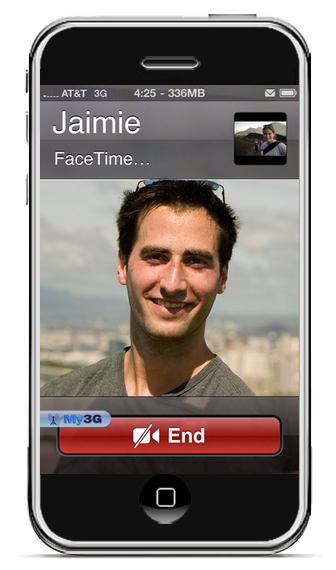
Enable FaceTime over 3G with My3G

Yes, finally the much waited app from Rockyourphone to enable iPhone 4 FaceTime video calls over 3G is here and it comes just after JailbreakME 2.0 from comex. This is really an amazing app, check the description..
>div align='center'>
Facetime over 3G!!!!

My3G: Take back your 3G! My3G makes Apps believe that they are on WiFi instead of 3G. With My3G, you can now watch HiDef YouTube videos, use Skype/Fring/Other VOIP apps over the 3G network!

Features:
- In-App popup request to enable/never ask for My3G to be enabled for that app
- In-App indicator when My3G changes the network from 3G to WiFi
- Ability to select which apps are My3G enabled and not.
- Default Apps – no configuration for the most popular apps!
- SBSettings Toggle! You can temporarily enable My3G for all apps or toggle back using your defined Apps list
- Dynamic enablement – Higher successs rate (near 100%) then 3G Unrestrictor (which does one off solutions for apps). My3G enables 3G indicators more dynamically.

4.1 Updates
=============
- Facetime over 3G!!!
Of Course you need a jailbroken iPhone 4, (use userland jailbreak from comex JailbreakME 2.0 to jailbreak iPhone 4), head on and buy this app only for $3.99 only from Rockyourphone.

Sunday, August 1, 2010

How to: Fix MMS / FaceTime Bugs on iPhone 4 After using JailbreakME 2.0

JailbreakME 2.0 userland jailbreak which was released today by comex, made some bugs and errors for iPhone 4. The popular bugs are breaking MMS and FaceTime not appear in Settings app, But we may fix it by that way.
Steps:
It's all about restoring iPhone 4 from Backup then jailbreaking using JailbreakME 2.0
  • Backup your iPhone 4 by Connecting it to iTunes, Right click on the iPhone icon on left column, then click on "Backup your iPhone"
  • Now use JailbreakME 2.0 to jailbreak again your iPhone 4, guide posted here.
  • Restore from Backup by Clicking on the iPhone icon then hold left shift and click on "Restore", then navigate it to iOS 4.0.1 Original Firmware
Update 1: Now Fixed for new jailbreakers. About the old users, Planetbeing says "You should now be able to fix FaceTime and MMS by updating Cydia and resetting your network settings. If not, restore and rejailbreak."

iPhone 4 Unlock will be Released after Small Period

Comex has released his userland jailbreak JailbreakME 2.0 two hours ago, and people was still complaining about unlocking iPhone 4 as we told you that the Unlock is ready before the jailbreak. Now, MuscleNerd has tweeted that iPhone 4 Carrier Unlock will be pushed to Cydia in a small period.
iPhone4 carrier unlock will be pushed after small test period (only @planetbeing and I have been able to test til now!)
This doesn't mean that it will be pushed today, may be tomorrow! Just Stay tuned with me on Twitter or on Facebook and I will post unlock guide to Unlock iPhone 4

Update 1: Planetbeing tweeted that the unlock for iPhone 4 will be Coming in the next 48 hours,
We will be releasing the unlock in 48 hours (after we conduct a private beta).

How to: Jailbreak iPhone 4 on iOS 4 / 4.0.1 using JailbreakME 2.0

Comex has just released his new userland jailbreak tool minutes ago, this is a simple guide and instructions for all you need to know about this jailbreak, Now you can jailbreak any iPhone (including iPhone 4), iPod Touch or iPad on all Firmwares.
Steps:
Step 1: You just need Wi-Fi network, Navigate your Mobile Browser Safari to http://jailbreakme.com and then touch and slide to jailbreak.

Step 2: Now Have fun, You got a jailbroken iPhone 4 as mine:
Finally, comex has just released his new tool "JailbreakME " to Jailbreak iPhone 4 / 3GS New and Old Bootroms, iPod Touch 3G / 2G on iOS 4 / 4.0.1 and iPad on iOS 3.2.1, It's pretty simple and install is painless with one click! no need to enter DFU mode, no more issues and errors, more custom firmwares. This is the real fun!
Description in the Site:
What's a jailbreak? Why jailbreak?
A jailbreak is simply the ability to run apps and use themes and tweaks not approved by Apple. Jailbreaking doesn't slow down your device or use any extra battery, and is fully reversible (just restore in iTunes). A jailbreak lets your device be how you want it.

Is JailbreakMe reversible?
Of course! If you ever decide that you want to remove your jailbreak, just connect your device to your computer, sync, and then press Restore in iTunes.

Is this legal in the US?
Yes. A new DMCA excemption was approved by the Library of Congress, specifically allowing jailbreaking.

Credits
Jailbreak by comex, website by westbaer and chpwn. Special thanks go out to BigBoss, chronic, DHowett, MuscleNerd, planetbeing, posixninja, and saurik. Thanks to everyone else that tested and helped, and all who donated.
It's a userland jailbreak, So all what you have to do is navigate browse to http://jailbreakme.com from your iOS device to jailbreak it but it's not accesible at the moment as huge traffic on the server.

Update 1: Modmyi has uploaded the tool on their site, now you can acess http://jailbreakme.modmyi.com instead of the above
Update 2: Supported devices,
  • iPod 1G on 3.1.2
  • iPod 1G on 3.1.3
  • iPod 2G on 3.1.2
  • iPod 2G on 3.1.3
  • iPod 2G on 4.0
  • iPod 3G on 3.1.2
  • iPod 3G on 3.1.3
  • iPod 3G on 4.0
  • iPad on 3.2
  • iPad on 3.2.1
  • iPhone 3G on 3.1.2
  • iPhone 3G on 3.1.3
  • iPhone 3G on 4.0
  • iPhone 3G on 4.0.1
  • iPhone 3G[S] on 3.1.2
  • iPhone 3G[S] on 3.1.3
  • iPhone 3G[S] on 4.0
  • iPhone 3G[S] on 4.0.1
  • iPhone 4 on 4.0
  • iPhone 4 on 4.0.1
Update 3: Just posted How to Jailbreak iPhone 4 on iOS 4 / 4.0.1 HERE.
Update 4: Just posted How to Jailbreak iPad 3G on iOS 3.2.1 HERE.
Update 5: We were informed that JailbreakME 2.0 opens a security hole on your device, the way to fix it HERE.
Update 6: For who stuck on purple screen, we got a way to solve that, check our guide HERE.

Saturday, July 31, 2010

Upcoming Comex Jailbreak seems to be Released Today

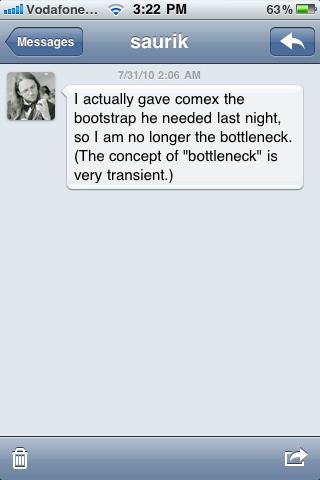
Quick heads up, someone published this image on the web, we don't know it's source but it's seems not fake! Comex mentioned in his podcast interview that he is waiting for saurik to finish Cydia bootstrap, the screenshot below shows a message from saurik saying that he already gave the bootstrap to comex.
I actually gave comex the bootstrap he needed last night. so I am no longer the bottleneck. (The concept of “bottleneck” is very transient.)
It seems really close, may be it will be released today and Sunday be the FunDay? Absolutely they are running a group of tests on all devices to be sure it's safe and excellent to be released for public, so Stay tuned!
Update 1: JailbreakME from Comex is out, Check here.

First iPhone 4 Cydia App "SpringFlash"

This days we are talking a lot about the upcoming jailbreak for iPhone 4 from comex, now BigBoss has created his first iPhone 4 Cydia app "SpringFlash", it's available now in Cydia but you should have a jailbroken iPhone 4!
Here's the blog post with title "First iPhone4 Only Cydia App":
Since the jailbreak is due very soon, I have created SpringFlash, the first iPhone 4 only Cydia app. SpringFlash is a springboard activator based LED flashlight for your iPhone 4. In short, you can have a touch of a button for a bright LED flashlight without hassling with unlocking your iPhone, closing your app, or even turning on your screen.
As shown in the quote above, the app is a springboard activator which gives you a bright LED flashlight without hassling with iPhone Unlock, Sure it's available for free on BigBoss repo whenever the jailbreak is available!
Stay Tuned, we will be covering this jailbreak tool from comex whenever it's released and available for download

Jailbreak iPhone 4 on iOS 4.x is "Pretty Close to Done"

Good News to get the hopes up, in an all-star podcast interview with Comex, Planetbeing, Chpwn, and Saurik yesterday, Comex was asked "When is the iPhone 4 Jailbreak and Unlock is going to be released?", the answer was great "pretty close to done"
Question: When is the iPhone 4 Jailbreak and Unlock is going to be released?

Comex: You will have to ask Saurik if he’s done with that bootstrap yet. Like I hate to say this because people will be complaining, but it is pretty close to done.

PlanetBeing: Unlock is done. Just waiting for the jailbreak to be released.

Chpwn: The jailbreak definitely needs a lot of testing before it is released, to make sure it works on everybody’s phone, and that there are no issues like Spirit had where it deleted all of your photos in the first few days of the release.
[via Redmondpie]
So here's What to Do to get Ready for the Jailbreak!
First, Save SHSH of iOS 4.0.1 Using TinyUmbrella for iPhone 4 / 3GS / iPod Touch 3G and Using Cydia for iPhone 3G / iPod Touch 2G
Second, Backup your Data in Case the Jailbreak has some issues (Save photos, contacts and videos)
Third, Follow me on Twitter, Become a fan on Facebook or Subscribe via Mail / RSS to be the First who Jailbreak.

So not to ask me, This jailbreak will work on any iDevice in the world, This jailbreak will be able to jailbreak iPhone 4 / 3GS New and Old Bootroms / 3G - iPod Touch 3G / 2G MC and Non-MC Models on iOS 4.x, Also for iPad on iOS 3.2.1

Tuesday, July 27, 2010

Download iOS 4.1 Beta 2 for iPhone and iPod Touch

Last Week iOS 4.1 Beta 1 Released for Developers, Now the Beta 2 of iOS 4.1 has been released and it's available for Download if you have a developer account to access Apple's developers Center to be able to download the SDK of iOS 4.1 Beta 2.
The SDK is build 10M2305a and the firmware is build 8B5091b.
You must have a developer account to be able to download iOS 4.1 Beta 2 for iPhone 4 / 3GS / 3G and iPod Touch 3G / 2G,
Download iOS 4.1 Beta 2 for iPhone and iPod Touch

Monday, July 26, 2010

iOS 4.0.1 on iPhone 4 Confirmed Unlockable

Well, Planetbeing today has posted on his twitter account that he has already updated to iOS 4.0.1 on his iPhone 4and that was a good thing to find that it's unlockable with taller bars. This unlock is the one that Planetbeing used before and Musclenerd said that it's the best and they will use it on the new update for Ultrasn0w.
I updated to 4.0.1. Yay, taller bars and the unlock still works fine out of the box.
Hey, The Unlock (Ultrasn0w 0.94) is Ready and they are just waiting for comex to release his new jailbreak tool that most of you say "Spirit", So Stay tuned to get the news whenever the tool is available for download.

Sunday, July 25, 2010

Jailbreak for iPhone 4 / 3GS on iOS 4 and iPad 3.2.1 Delayed

Well, this post wasn't important but I think most of you thought that Semi-Spirit Jailbreak for iPhone 4 would be out at the end of this week? nope, you may need to read this post. I will talk about two points, the first is that the Jailbreak is delayed due to some issues in FaceTime and Multitasking, Second point is that most of you think it's "Spirit" but due to some sources, It's Not!
Delayed, due to MuscleNerd tweets
Not to make it a daily thing, but since somehow people thought it would be today: the new JB+unlock won’t be out today

(there are issues with important apps like Facetime that need to be figured out…no sense releasing a half-broken JB)
Well, the second point is that it's not Called Spirit as MuscleNerd replied to someone who asking something mentioning "Spirit" and MuscleNerd told him I said it's upcoming comex jailbreak not Spirit, Also Ultrasn0w unlock will be available whenever the Jailbreak is out as the unlock is Ready! So Stay Tuned for covering the event whenever the download is available.

Saurik talks again about the History of Jailbreaking

Two days ago, I already showed you a video showing an interview from MakeitWork with Jay Freeman a.k.a Saurik, Today he made another interview and again from MakeitWork, Saurik joined Jeremy Anticouni for an exclusive interview for Make It Work Radio, which aired Saturday July 24, 2010 talking about landscape and the history of jailbreaking!
This interview consists of two videos as it's a long one, check both videos below,


Jailbreaking iPhone 4 is really seems very near, So Stay Tuned!

TwitPic Uploader, Now supports iPhone 4 and iOS 4

Of course all users of Twitter and iPhone should know this app, Twitpic uploaded upload your images and screenshots directly to show it to your Twitter users, and now it has been updated the biggest update yet, this updated brings support for iPhone 4 and iOS 4, also fix some issues! Check the full Changelog after the jump..
What's New In Version 1.4.1
The biggest update yet! Includes the following new feature additions:
- Landscape mode.
- iOS 4.0 and iPhone 4 support (including complete support for iPhone OS 3.0 and 3.1).
- Continue uploading while the app is in background. (iPhone 3GS, iPod Touch 3rd gen. with iOS 4 and iPhone 4 only).
- Multiple accounts (under landscape mode).
- Twitter OAuth and TwitPic OAuth Echo support.
- Does not store the twitter login password anymore.
- Settings within the app (under Accounts).
- Tweet character counter.
- Automatic URL shortening.
- No more enforced 115 max characters in Tweet.
- Automatic Tweet truncating to max available tweet length.
- Better low memory situation handling.
- Better image optimization handling.
- Crash resistant.
- Water proof. :D
Download Twitpic Uploader for iPhone, iPad and iPod Touch [iTunes Link]

Friday, July 23, 2010

Unlock iPhone 4 is Ready, Waiting for Jailbreak

Today we have good news, MuscleNerd talked about unlocking iPhone 4, He said that you can Unlock iPhone 4 permanently without need to Ultrasn0w by getting the codes out of the seczone to calculate your NCK code, But this Process will have to go over 100 trillion combinations. So in a tweet answering someone who don't understand telling him that the Unlock is ready and he is waiting for public Jailbreak release from comex.
Here's Gangstatyzz asking MuscleNerd:
@MuscleNerd I'm guessing the jailbreak is going to be released soon Because you guyz keep talon bout how theirs a unlock for it
MuscleNerd answering him:
@Gangstatyzz hmm just staying the unlock is ready now, for whenever the public JB is done + debugged + packaged
Also Planetbeing Yesterday tweeted that Ultrasn0w will be available in Cydia whenever comex's Jailbreak updated:
It will probably be the usual thing where you jailbreak and then install ultrasn0w from Cydia.

We're gonna be able to give you an unlock with the jailbreak.
Let's talk about The next Jailbreak from Comex, It will (un)tethered "Spirit" Jailbreak and it will be able to jailbreak your iPhone 4 / 3GS (Old+New Bootroms) / 3G, iPod Touch 3G / 2G (MC+Non MC Models) on iOS 4.0.1 / 4 and also may be on iPad 3G / WiFi on iOS 3.2.1! So Stay Tuned